


Connect to the TV in Team Rooms

Nov 21, 2025
 262
262
HDMI – available in all rooms
- Power on TV
- Connect the HDMI Cable to your Device
- On the remote, select HDMI 1
Cast to the TV (available in Rooms 2B, 2D, 2E, 2F, 2G & 2I)
- Power on TV
- Press Windows K
- When this screen appears, select [LG] webOS TV UP7000PIA and press connect.
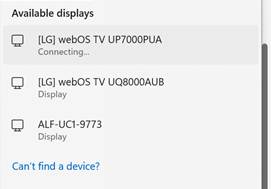
- On the remote, click the Select button to Accept the connection.
To connect use the speakerphone (available in Rooms 2I, 2B, 2D, 2G)
- Click on the Place a Call button
- Dial the phone number to connect via phone, dial the number in meeting invitation.

